
You should not need to watch your company all day.
ErezAgent watches the work and tells you what deserves your attention. Its AI Chief of Staff is your personal assistant for the company: it manages your attention, not just your prompts.
Five views of the day.
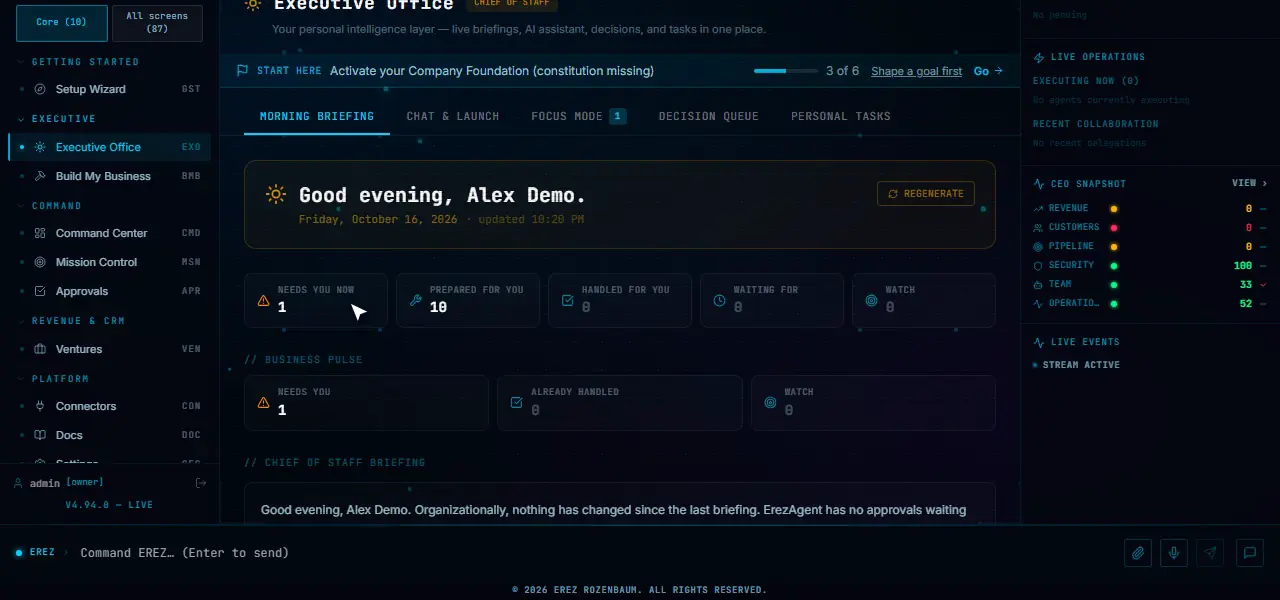
Your Executive Office opens with a briefing and five views, so in a minute you can see what needs a person, what is ready for review and what is only worth watching.
The five views, and where you approve
01Needs You Now
Approvals, risks, blockers and exceptions that need a person, gathered in one list so you do not have to look in five places. In the Executive Office it opens Focus Mode, a short list of the few things that make today a success.
Each approval comes with a short decision brief: why it matters now, a recommendation, and the precedent from that agent’s own past decisions.
02Prepared For You
Work your AI agents finished in the last 24 hours and that is ready for you to review: research, drafts, analyses and recommendations. Each item shows what was produced, which agent produced it, and a short summary.
This is completed work that already ran inside the authority you set. It is not a stream of new drafts started behind your back.
03Handled For You
What happened while you were away, such as overnight activity, listed in your briefing with a record of what ran. The point is that you can trust a quiet morning, because you can see what was done and by whom.
Anything consequential is not here by default: sending, spending, publishing and deleting wait for your approval and appear under Needs You Now.
04Waiting For
The commitments and dependencies that are open: things you owe, things owed to you, things an AI agent owes you, and things the system is waiting on. Each has who it is with and a due date.
You can add a commitment yourself in a few seconds. Items that are due or overdue surface on their own, checked every thirty minutes, so a promise does not slip because nobody was looking.
05Watch
AI recommendations that need no action yet but deserve a place in your view. Each shows a category and its likely impact, and many open the screen where you can act on it.
Watch is the calm end of the list: things to keep an eye on, ranked so they do not compete with what needs you now.
06Approve here
Approve or reject on the same screen where you see the item, with the evidence next to the buttons. Approving is an owner action; observers can read and ask, but not approve.
Every approval and rejection is recorded in the audit log, the same as an approval made anywhere else in ErezAgent.
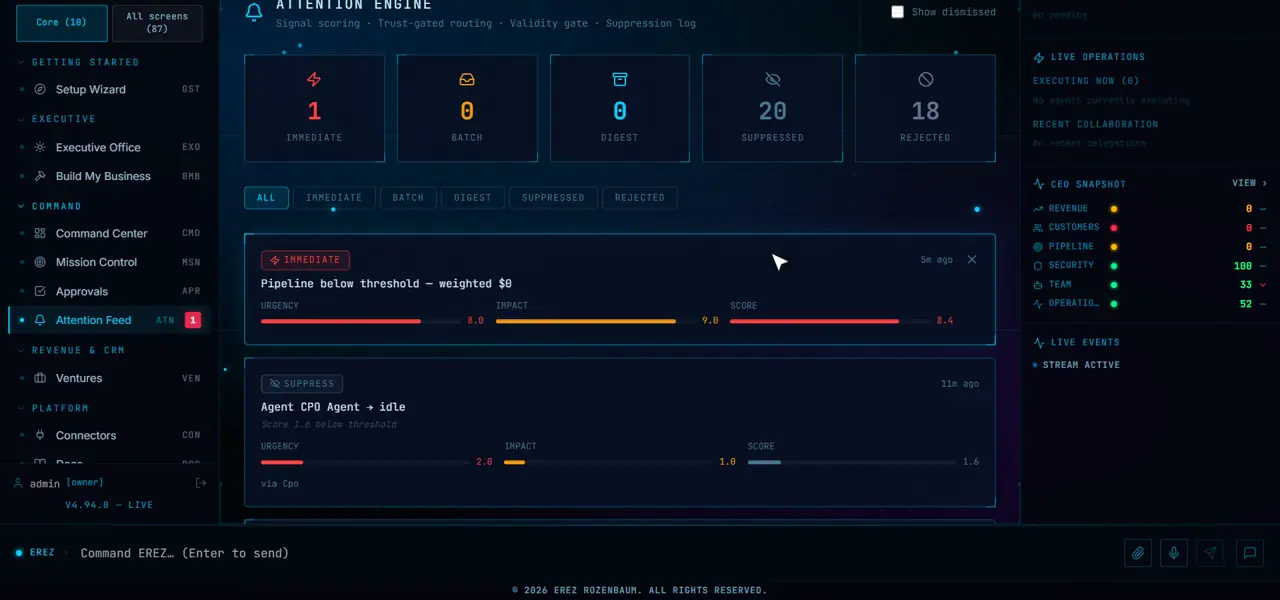
It doesn’t wait to be asked.
ErezAgent keeps watching real data from your own system in the background, scores what it finds and puts the important items in front of you. It can turn a finding into a task, a mission or a governed action.
- Customer health, churn risk, and customers nobody has contacted in a while
- Deals that have stalled and next actions that are overdue
- Commitments you or your team made that are overdue or due
- Budget and AI spend against the limits you set
- Security findings
- Renewals that are coming up
- Missions that are stalled, overdue or blocked
- Urgent support cases that are past their deadline
This is monitoring and scoring of your data, not invented autonomy. ErezAgent can observe, prepare, recommend and escalate; consequential actions still wait for you. How approvals work
A daily briefing, your commitments and a way to ask.
The same operating surface holds the briefing, the open loops and the conversation.
Daily briefing
A briefing assembled from real signals: what needs you, what moved and what is at risk.
Tasks and commitments
Track your own tasks privately, and the commitments others owe you. Items that are due or overdue surface on their own, checked every thirty minutes.
Chat and voice
Ask what needs you, or approve, by typing or by speaking. Chat needs an AI provider; voice needs speech-to-text and text-to-speech providers.
What it does not do.
- It does not plan your day around your calendar.
- It does not take consequential actions by itself: sending, spending, publishing and deleting wait for you.
- It does not replace your judgement: it prepares the decision and shows the evidence behind it.
- It is not only a chat window: chat and voice are two ways into the same governed system.
See your own day in it.
Book a demo built around a goal of yours, or apply for a guided pilot on your own infrastructure.
Paid evaluation and guided deployment: talk to us. See the plans.